
At first glance, the swissdamed upload appears simple: export a file from EUDAMED and import it into the Swiss database. But is it really that straightforward? Since many of our customers must work with both EUDAMED and swissdamed, we developed an additional module for swissdamed UDI compliance. In this article, we share our key insights.
In this report, we discuss our experience in software development as well as the learnings from our customers. We provide technical insights into UDI uploads in swissdamed, explain relevant business rules, and highlight potential challenges.
Context: Swissdamed as the Swiss Counterpart to EUDAMED
Swissdamed, the Swiss database on medical devices, is a database established by Swissmedic for registering economic operators and medical devices, including in vitro diagnostics, placed on the Swiss market. It also applies to Liechtenstein. The structure closely mirrors EUDAMED.
However, there is no direct connection between EUDAMED and swissdamed for data exchange. Manufacturers are responsible for manually transferring data from EUDAMED to swissdamed.
Swissdamed Timeline
- Since August 2024: Actor registration has been possible.
- Since August 2025: The Device/UDI module has been available.
- From 1 July 2026: Registration becomes mandatory.
- Transition period: Until the end of 2026.
What We Tested: Technical Insights from Software Development and Customer Projects
Manufacturers, or their authorised representatives in the case of companies based outside Switzerland, must transfer data from EUDAMED to swissdamed. Uploads can currently be performed only via XML files using EUDAMED‑compatible formats (“GET DEVICE” or “POST DEVICE”). Below, we describe both variants along with the experiences of our development team and our customers.
How Does the XML Upload in Swissdamed Work?
The EUDAMED application provides various upload and download services, as described in the official EUDAMED Services Definition.
Swissdamed supports both “Device Service” variants. Meaning it accepts XML files defined in EUDAMED as GET DEVICE or POST DEVICE. Additional upload methods, such as M2M connections, will become available at a later date (no timeline confirmed).
Swissdamed accepts two XML file types:
GET DEVICE
- Generated when downloading data from EUDAMED
- Allows any economic operator to download XML files from the restricted EUDAMED area
- Guidance available in the UDI User Guide, chapter “Download Devices or SPPs data in a structured format (XML)”
POST DEVICE
- XML files that are generated by the manufacturer for bulk upload into EUDAMED.
- Must match the current EUDAMED XSD schema version. Important: EUDAMED Playground and EUDAMED Production use different schema versions.
- Swissdamed only accepts files matching the schema/version used in its current environment.
- XSD schema files can be downloaded from the official EUDAMED technical documentation.
Other EUDAMED service, such as the BASIC UDI‑DI service, are currently not supported by swissdamed.
Both described XML formats can be used for data upload into swissdamed.
Challenges Reported by Our Customers & Development Team
On paper, the process seems simple: download your UDI XML from EUDAMED and upload it to swissdamed. However, both customers testing the swissdamed upload and our developers working on the swissdamed Compliance Module for the mytracekey software describe several challenges that only become visible during implementation.
Bulk downloads from EUDAMED are heavily limited
- Officially, only up to 20 UDIs per file can be downloaded manually
- Some customers report only 3–4 UDI records before the system becomes overloaded
- Data can only be downloaded page by page
- Larger datasets require repeating the process per page
- Result: a large number of individual XML files
M2M downloads are also limited
- Automated M2M queries can retrieve up to 300 UDI‑DIs per request
- Requires an existing M2M connection
- If integrated into a software system that continuously sends automated requests, this limitation becomes manageable even for large datasets
Special Device Types
Swissdamed only accepts these if Master UDI DIs exist. But legacy devices that would have a Master UDI-DI according to the Medical Devices Regulation (MDR) and therefore require a special device type cannot be uploaded to swissdamed.
Business Rules
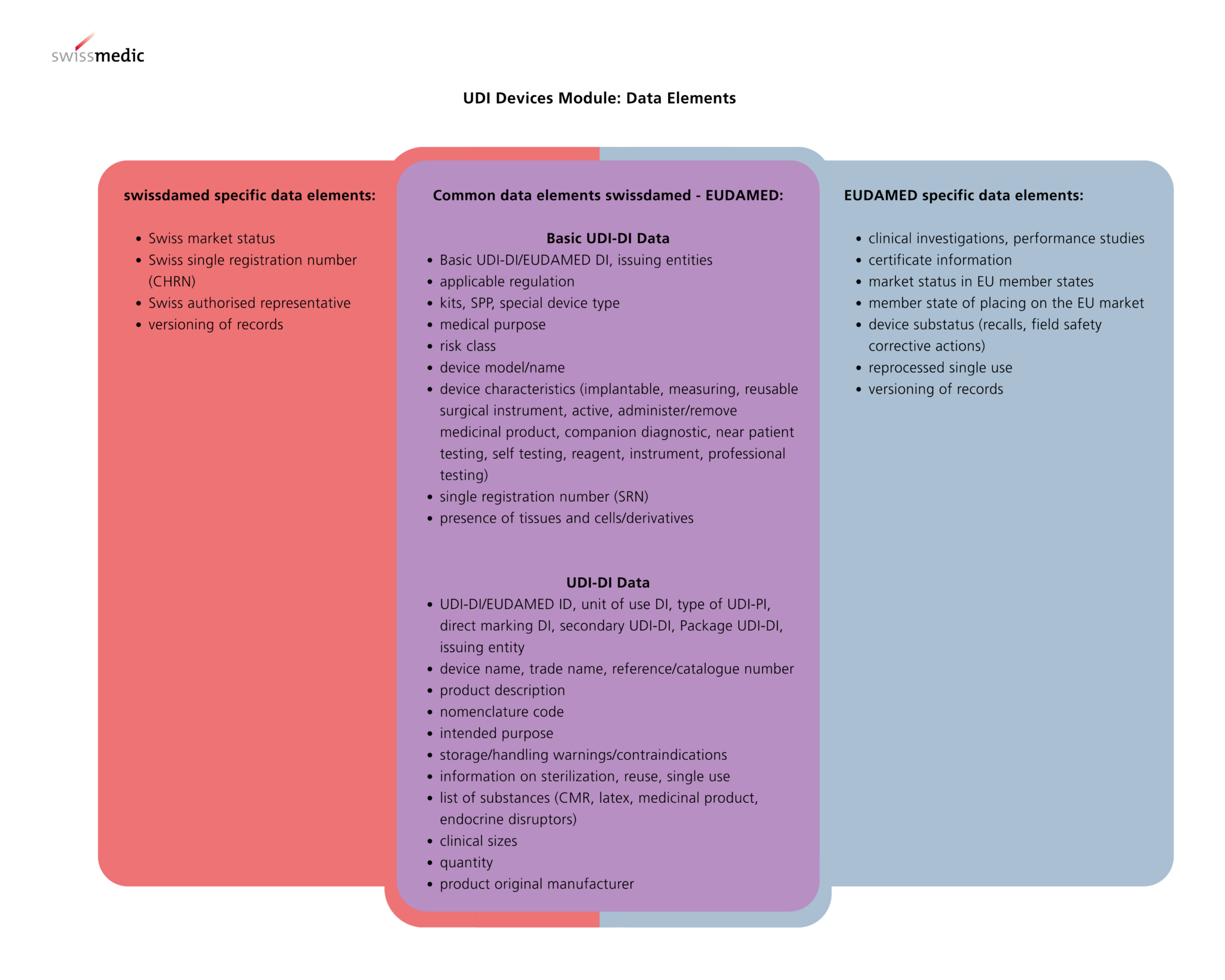
Swissdamed uses its own set of business rules, adapted from EUDAMED.
Some EUDAMED rules are mapped differently, leading to possible upload errors.
“Not all business rules from EUDAMED are used in the same way in swissdamed. Some rules apply only to swissdamed and do not have an equivalent in EUDAMED. Multiple EUDAMED rules may be combined into one swissdamed rule.”
Source: Swissmedic
Swissmedic provides a document describing the exact mapping.
Overview of Differences in Data Elements Between EUDAMED and Swissdamed
Legacy Devices in Swissdamed
Legacy device registration is possible, but not in all configurations (see Special Device Types).
Swissdamed generally follows EUDAMED logic: legacy products with EUDAMED ID or DI can be uploaded.
Technical Validation
Similar to EUDAMED, swissdamed performs:
- XML schema validation (must match EUDAMED XSD format)
- Validation against swissdamed business rules
Errors in either step will cause the upload to fail.
M2M or External Software as a Scalable Solution
Manual downloads from EUDAMED are limited and not feasible for manufacturers with large portfolios.
Swissdamed currently offers no additional automated API beyond the XML upload mechanism.
Our Process for New Customers Who Already Completed UDI Registration in EUDAMED
- Download EUDAMED datasets via our M2M
- Transform into swissdamed‑compliant records (validated against swissdamed business rules)
- Provide XML files in the required format for swissdamed upload
Our Process for Existing EUDAMED Customers Using mytracekey
- Download necessary EUDAMED datasets from the UDI Manager
- One‑click transformation into swissdamed‑compliant datasets
- Upload into UDI Manager, including swissdamed business rule validation
- Download of XML files in the required format for swissdamed upload
Key Learnings for Manufacturers
Based on our tests and customer feedback, it is clear that adjustments are always necessary, even when using “EUDAMED‑ready” XMLs. While the swissdamed upload process itself is relatively simple, the major download limitations in EUDAMED significantly complicate the workflow.
- Swissdamed requires specific validations and structural requirements
- Special Device Types and Legacy Devices remain a sensitive topic
- Business rule limitations must be evaluated case by case
- Uploads only succeed if Actor data is fully completed (CHRN, Actor Code), otherwise the process fails early
[Disclaimer]
The information provided here is only one possible interpretation of the regulations. These are also subject to constant change, so the information in this article may be incomplete or no longer up to date. The above article is expressly not intended as legal advice. Please consult the official documents before making any business decisions. (Information status: February 2026)